


PLF’s are no longer required for entering or re-entering the UK, however I’m going to leave this blog post live just in case.
Do I need to complete a Passenger Locator Form when entering the UK on a cruise ship?
UPDATE: From 4am Friday 18 March, all COVID-19 travel restrictions will be lifted, including the passenger locator form (PLF) for arrivals into UK, as well as all tests for passengers who do not qualify as vaccinated. This change, therefore, removes the need for unvaccinated passengers to take a pre-departure test and a day 2 post arrival test.
What is the form used for?
The information you give will be used to contact you if someone you travelled with develops COVID-19 symptoms. It may also be used to check that you are following any quarantine rules that apply to you. If you are cruising to green list countries, you shouldn’t need to quarantine.
According to the government, your information will be kept for 42 days then deleted, unless it’s needed for related work.
It’s a fairly lengthy form, but the government website allows you to start it, save and come back to it later. You can complete the Passenger Locator Form on laptop or on a phone or tablet.
Do I need to complete the form on board, or at home?
The official government website says “If you’re travelling on a cruise that lasts 19 days or less, submit the form in the 48 hours before boarding. If your cruise is longer, you can submit the form while travelling.”
A lot of cruise lines seem to be providing sessions onboard to help you fill out your PLF if you’re unable to do it before the cruise.
A step by step guide to filling in PLF
Disclaimer – this form doesn’t seem to have been created with cruises in mind! The government website gives a helpline on their help page (https://www.gov.uk/guidance/passenger-locator-form-how-to-guide) however I’m hoping this can help somebody.
What will you need to complete the passenger locator form?
To complete the form you’ll need:
- your passport details or the travel document you’ll use when you arrive at the UK border
- your travel details, including times and dates (if you’re cruising, this means your cruise itinerary)
- the address where you will stay when your return to the UK (so if you’re going straight home after the cruise, this just means your home address)
- booking reference numbers for the COVID-19 tests you must take after arriving in the UK
- QR code to prove your vaccination status, and say where you were vaccinated. (If you’ve not got this or don’t know how to find it this don’t worry, I’ll come back to that)
Here you can see my exact cruise itinerary, so you can see how it matches up with the entries on the form.

Step 1 – Let’s start at the very beginning!
The first thing you will need to do is go to www.gov.uk/provide-journey-contact-details-before-travel-uk. The screen will look like below, and gives you a basic overview of the form.

Scroll down the page until you find the green button that says Start Now.

Step 2 – Create an account
You will be prompted to create a passenger locator form account. Although you can submit a passenger locator form without creating or using an account, creating an account means you can start the form and return to it later. If you are happy to create an account, select Yes.

Step 3 – Set an email address and password
On your next page, you will be asked to enter an email address and password so you can save your answers. You will then be emailed a unique link to let you log back in to your form at a later point. Throughout your form, you can select the option to ‘Return to this form later’ in order to re-send the link to your latest saved form.

Step 4 – Personal Information and Vaccination Status
When starting to fill out the form, the initial information is pretty self-explanatory. You’ll first be asked for some personal information such as contact details, given names and home address. You’ll then be asked for your passport details, including passport number, country of issue and expiry date.
You’ll then be asked about your vaccination status. If you are double vaccinated, which you should be for most cruise lines cruising from the UK or accepting UK passengers, it will ask you to verify that you:
- have been fully vaccinated under the UK vaccination programme, at least 14 whole days before the date you arrive OR
- have been fully vaccinated under a vaccination programme approved by the UK at least 14 whole days before the date you arrive AND
- possess a COVID-19 vaccination certificate (paper or digital) with all the following information on it as a minimum:
- forename and surname(s)
- date of birth
- vaccine brand and manufacturer
- date of vaccination for every dose
- country of vaccination and/or certificate issuer

Step 5 – Vaccination Information
Next up, the form will ask if you have been fully vaccinated from COVID-19, and will ask which country did you receive your COVID-19 vaccination(s) in?

The next questions are:
- Do you have a QR code that you can use to verify your vaccination status?
- Have you provided proof of your vaccination status?
Here you can scan or attach a file or screenshot with a single QR code proving that have you have had a full course of COVID-19 vaccinations. You can get one of these QR codes through the official NHS app – the “Your Health” section of the app lets you show a QR code (you’ll need to do this on boarding) , and also lets you download a QR code or email it to yourself to print off and use.
If you are completing the form on a laptop, your internet browser may ask to activate your webcam in order to scan the QR code.
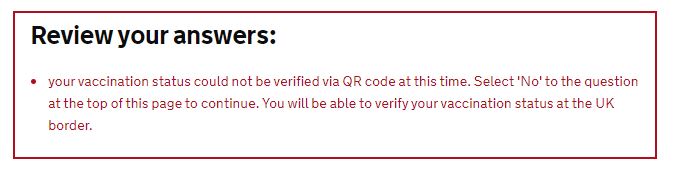
I had trouble uploading my QR code and received this message, so I’ve had to click no. You’ll need to carry proof of vaccination with you anyway.
Step 6 – Travel Information
This is perhaps the more complicated section of the form, but we can work through it step by step.
The first question asks about your travel plans. If you are a UK resident returning home after the cruise with no onward travel plans, select “Stay in the UK”

Next you will be asked about Details Of Your Arrival In The UK:
- Where will you arrive in the UK? – this means where you renter the country, whether that be via airport or cruise port. In this case, I’m cruising back to Southampton. so I’ve entered Southampton Docks.
- What country are you travelling from? – here you need to put the final port on your itinerary, so for me this is Gibraltar
- Which company are you travelling with? – Simply start typing the name of your cruise line and it should appear
- What is the flight number, train number or ship name that you will arrive on? – Here I’ve typed Sky Princess along with the Voyage Number for good measure.

.
Next up you will be asked for your dates for travel.
- When do you plan to arrive in the UK? – this is pretty self-explanatory – in my case, my cruise arrives back in Southampton on 5th November, so I’ve entered 05/11/2021 – remember, you’ll need to fill this form out in DD/MM/YYYY format.
- What time will you arrive? – here enter what time you flight lands, or your ship arrives – I’ve put 07:00 for arrival back into Southampton
- When do you plan to leave the UK? – this is an optional question – if you’re a UK resident returning home, leave this blank.

Step 7 – Information about the countries you have visited
Because I’ve said I’m travelling from Gibraltar, as my final port before Southampton is Gibraltar, the form is asking me about “Your visit to Gibraltar.”
The form asks if I have visited, or will visit, any islands in this country during the 10 days before you arrive in the UK? Gibraltar is attached to the mainland, so I’m selecting “No”.
You will then be asked about the Arrival date and Departure date from that location. As it’s a cruise stop, I’m putting 2nd November 2021 for both, as per the cruise itinerary.

You’ll then be asked if you are visiting any other countries or islands in the 10 days before re-entering the UK – if you are on a cruise lasting longer than 10 days, like I am, pay careful attention to the ports.
So, in my case, I’ll be visiting ports in Spain and France, so I’ll click Yes.
First I’m completing my information for Spain. On this cruise, I’ll be visiting the island of Mallorca, so I click Yes to the “Have you visited, or will you visit, any islands in this country during the 10 days before you arrive in the UK?” question.
For the arrival date, I’m entering the day I’m in the first Spanish port, and for the departure date, the day I’m in the final Spanish port.

Click save and continue and add your next country, if applicable. Next you can see how I’ve added the French ports.
I’ve said yes to the island question again because we’re visiting Corsica, and the date corresponds with our first port of Marseille and second port of Corsica.

Once you’ve finished adding all the countries you’ll visit in that 10 day period before you re-enter the UK, you can click “No” when prompted to add more countries.
Step 8 – Where you will stay in the UK
Next up you will be asked about where you are going to stay in the UK for the 10 days after you return – for most this will be your own address.
If you click Yes, you’ll be asked to verify if the address you’ll be staying is your home address.
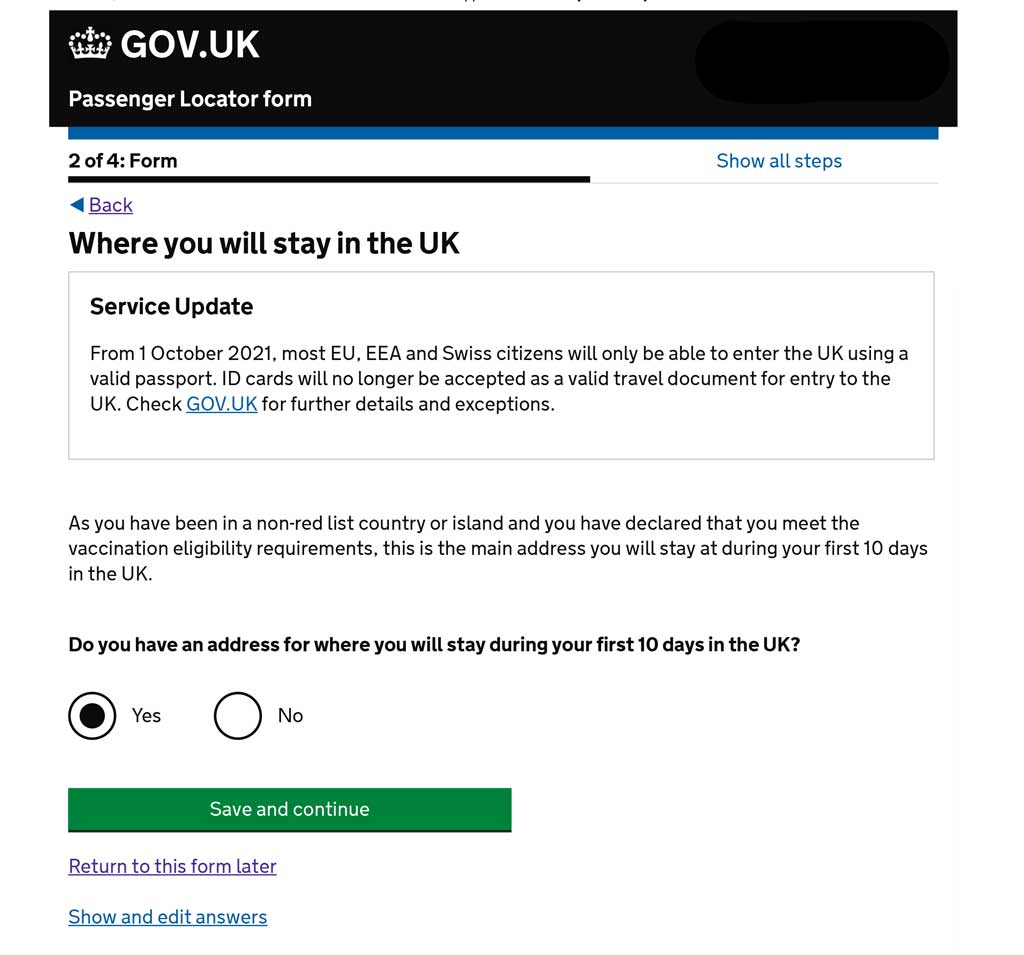
You’ll then be asked if you’ll be staying anywhere else in the UK – I’ve said no as I’ll be staying back at home!

Step 9 – Testing after you arrive in the UK
At the moment (October 2021) you need to pre-schedule a COVID-19 test to be taken within two days of disembarkation. As I’m writing this, that test needs to be a PCR however from 24th October fully vaccinated passengers and most under 18s arriving in England from countries on the green list can take a cheaper lateral flow test, instead of a PCR test, on or before day 2 of their arrival into the UK. These can be booked from 22 October.
So, for this question you’ll need to answer is are you required to book a test, you’ll then need to give your booking reference number.

Step 10 – The finish line is in sight!
That’s it! You’ll be taken to a summary screen where you can check over all your answers.
Step 11 – Declaration
You’ll then be asked to complete a declaration verifying your details are correct, you understand you’ll get in trouble if you’ve told any porkies and you understand that you’ll need to provide proof of vaccination.
IMPORTANT! Click the tick box to be sent a PDF of your answers by email.

Step 12 – Download and print your PLF
You’ll hit a confirmation screen saying your form has been submitted and a copy has been emailed to yourself. There will be a button to allow you to download a copy immediately in order to print it off.

Do I need to take a COVID-19 test returning to the UK after a cruise?
As of 18th March 2022 no-one entering the UK will need to take tests or complete a passenger locator form! For up to date info, check out the Government advice.
When you are returning to the UK post-cruise, you used to need to pre-schedule a COVID-19 test to be taken within two days of disembarkation. The PLF form included a requirement to give confirmation details that you have booked this test. We booked our tests with Eurofins who offer either Day 2 home testing kits or drive-through test sites around the UK , the latter from £20!

The booking confirmation details for your two-day post-cruise test will be requested on the Passenger Locator Form.
What happens if my cruise itinerary changes after I have completed the Passenger Locator Form?
If any of your information changes after you have submitted your form, including your travel details or contact information, you must complete a new form.



Many thanks for these detailed and very useful instructions
Thank you so much – step by step instructions – wonderful